All operations of your education center in one system.

From registration to attendance, from attendance to debt, from debt to teacher salary and the monthly report — every link of the chain closes automatically.

TEDRA is built for these centers

Live room board: today’s lessons in four rooms shown hour by hour — lessons that are done, running now and waiting, attendance rate, payments received and the latest system notification.

Today’s four rooms, hour by hour: what is done, what is running now, what is next.

The work chain of an education center: registration, schedule, attendance, payment and report are linked to one another, and every step triggers the next automatically.

Product screen demonstration: when a lesson is held, attendance is confirmed, the system calculates the debt automatically, and the indicators update when a payment is received.

Excel or Notebook TEDRA

Scattered data finds its place

Scroll down. Each dot is a student, a payment, a lesson — from being scattered across Excel sheets and notebooks until it lands in its own column.

16modules — activated as you need them
3cities in active use: Baku, Sumgait, Khachmaz
100%Azerbaijani-language interface, reports and support
3 business daysto set up and migrate your data
Comparison

How is your center managed today?

Most education centers pick one of three ways. The difference shows in the result.

CriterionTEDRA ERPExcel + paperGeneral-purpose ERP
Azerbaijani-language interface and reports Yes You build it yourself Often missing
Debt recorded automatically when attendance is confirmed Automatic Calculated by hand Requires custom setup
Teacher salary based on lessons held Automatic A separate sheet Usually missing
Parent communication and notifications (CRM side) Included Individual phone calls Limited
Multiple branches and separate reports per branch Included Separate files Available
Time to go live 1 business day — Weeks, sometimes months
Support language and accessibility Azerbaijani · direct team — In a foreign language · ticket system
Inside the system

Not an advertising picture — screens of a working system

All taken from TEDRA’s live demo environment (the interface is shown in Azerbaijani).

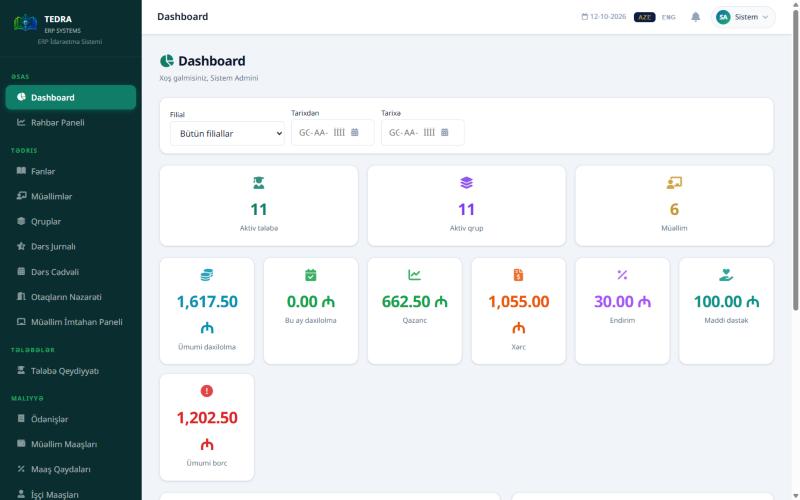
01 Dashboard

The whole center
on one screen

  • Active students, active groups and teacher count — in real time
  • Revenue, expenses, discounts and profit side by side
  • Choose the branch and date range, and the numbers update instantly
1,617.50 ₼ revenue · 662.50 ₼ profit
TEDRA ERP — Dashboard screen
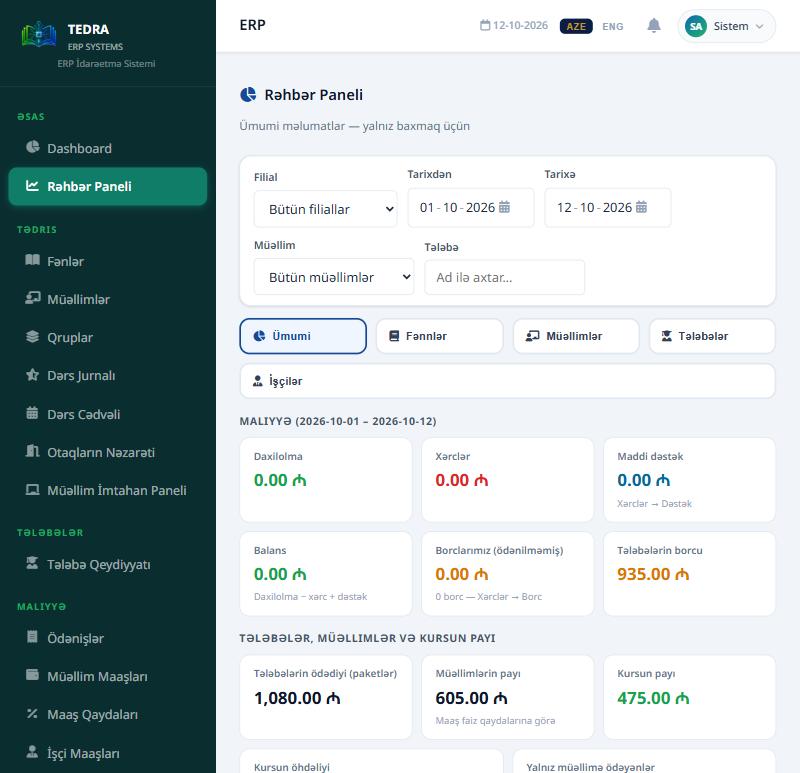
02 Executive Panel

The owner sees,
without touching

  • View only — data cannot be changed
  • Finance by subject, teacher, student and employee
  • The teacher’s share and the center’s share are calculated separately
Teacher’s share 605 ₼ · center’s share 475 ₼
TEDRA ERP — Executive Panel screen
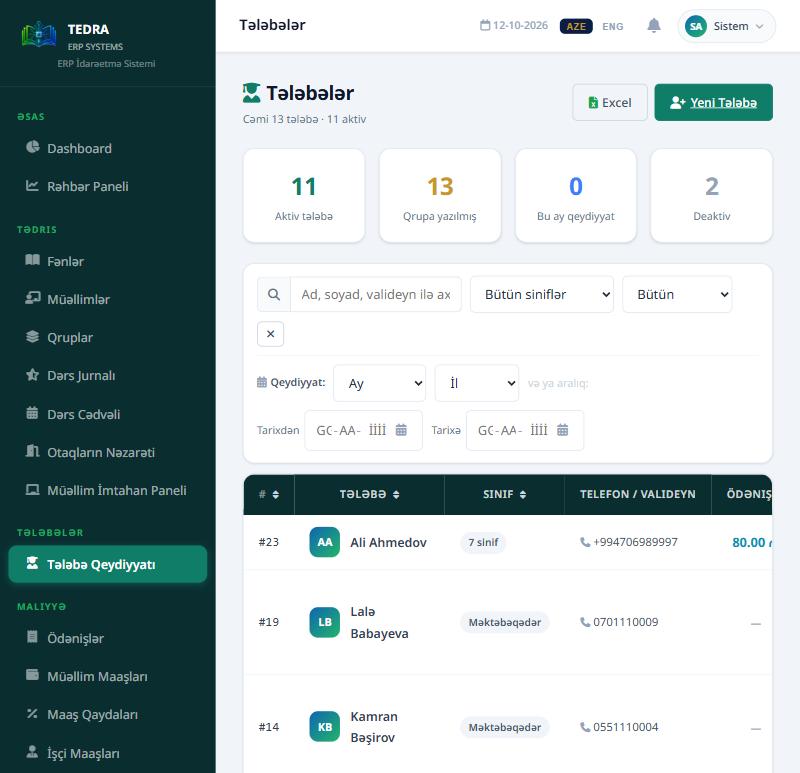
03 Students

Every student
on one row

  • Name, grade, parent contact and payment status
  • Filter by grade, registration month and date range
  • The whole list exports to Excel in one click
13 students · 11 active · 2 inactive
TEDRA ERP — Students screen
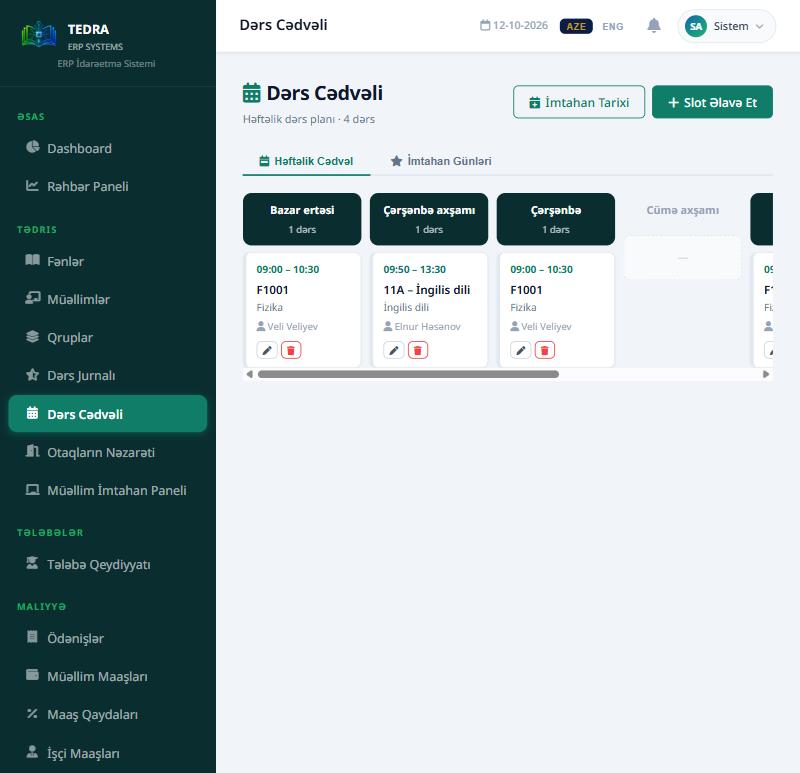
04 Schedule

The weekly schedule
at a glance

  • Day-by-day slots: time, group, subject and teacher
  • Weekly lesson schedule by group and teacher
  • Exam days are kept in a separate tab
Weekly plan · 4 lessons · 2 rooms
TEDRA ERP — Schedule screen
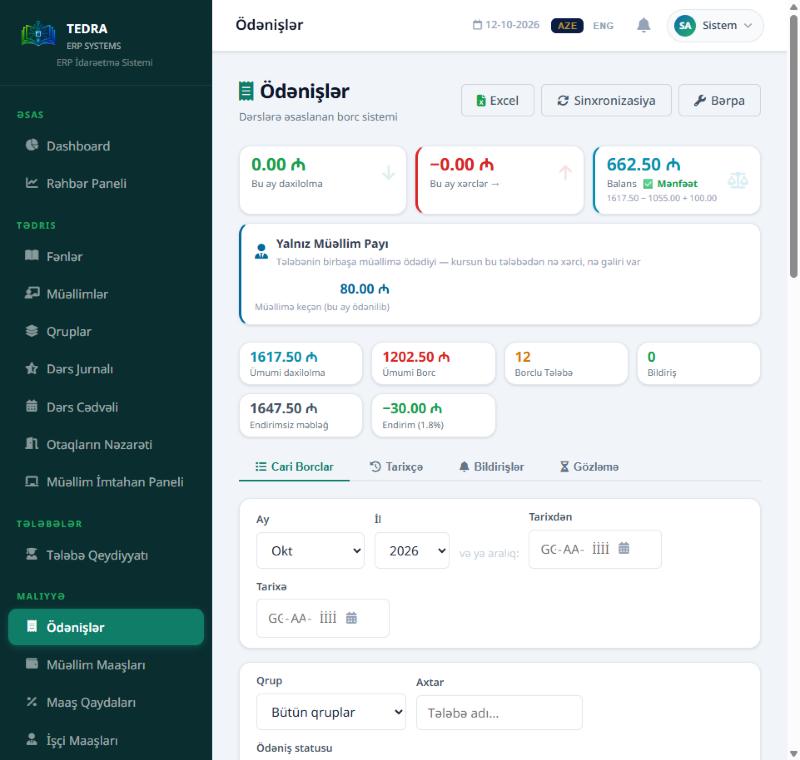
05 Payments

Where the money goes,
where it stays

  • Lesson-based debt — as many as the lessons held
  • Current debts, history, notifications and pending payments
  • Discounts and the teacher’s share are shown separately
12 students with debt · discount 1.8%
TEDRA ERP — Payments screen
For the owner

What does the center owner look at in the morning?

Not the number of students — profit, the teacher’s share and the difference between branches. TEDRA meets these questions with a ready answer every day.

Profit, not just revenue

Revenue is half of the picture. TEDRA takes expenses, discounts and financial support into account and shows the real balance.

Revenue − expenses + support = balance
Teacher’s share and the center’s share

How much of each payment goes to the teacher and how much stays with the center — split automatically according to the salary rules.

Teacher’s share 605 ₼ · center’s share 475 ₼
View by branch

How much each branch brings in — choose the branch and date range, and all numbers update accordingly.

Filter by branch and date range
From subject down to student

Subject, teacher, group and student — revenue and share breakdown opens in one click at every level.

Subject → teacher → group → student
Frozen enrollments

Frozen students are not counted in revenue but are shown separately — the full picture does not disappear.

Not counted, shown separately
Debt — one indicator, not a topic

Debt matters, but it is not alone. How many students, how much, how many days overdue — in one row.

1,202.50 ₼ · 12 students with debt

The moment the teacher confirms attendance — the debt is recorded, the parent is notified, the report updates.

You do nothing. The chain works by itself.

Student profile

Every student — on one screen

Attendance, payment status, grades and the next lesson. When a parent calls, the answer is found in one click. Pick a student on the left.

AH
Aynur Hüseynova
English · B1 · Group 3 · age 14
Payment: up to date
92%attendance
(last 30 days)
Last 10 lessons
Recent grades
Next lesson
Tomorrow 10:00 · Room 1 · S. Əliyeva
Last payment: 150 ₼ · 02.09 Current debt: 0 ₼ Parent: Aygün Hüseynova
Modules

16 modules — activate only what you will use

A small center starts with the modules it needs, a branch network uses all of them. Next to each module it is written what it takes off your daily work.

Student registration Your existing Excel list is migrated as it is
Teacher management Teaching load, hours and contract in one place
Subjects and groups Level, group capacity and number of free seats
Schedule Weekly lesson schedule by group and teacher
Attendance The moment it is confirmed, the debt is recorded automatically
Payments Who, when, how much — tracked day by day
Teacher salaries Calculated from the lessons actually held
Staff and HR management Contract, leave and staff attendance
Assessment Grades and the student’s progress over time
Reports and Excel Any report to Excel in one click
Notification system Debt and lesson reminders are sent to parents automatically
Internal messaging Correspondence between teachers and administration
Contract templates The student contract is filled in automatically with the data
Multi-branch support Each branch is managed separately, and the head sees them all together
Role and permission management Who sees what — configured per module
Mock exam system A mock exam is created and results are calculated automatically

Need a module that is not on the list?We build a module that fits your center.
Request a custom module
There is a CRM inside too

Part of the modules manage relationships, not operations

TEDRA is an operations system — registration, attendance, payments. But relationship management is inside it too: who was notified and when, who gave what feedback.

Notifications and remindersPayment reminders are sent to the parent automatically. Which notification went to whom and when is recorded.
Feedback and anonymous surveysParent and student satisfaction is measured, and teachers are evaluated. A problem is visible before it turns into a complaint.
Parent contactEach student’s parent contact details are in the profile. Attendance, debt and notification history on one screen.
Loyalty and retentionParents who pay on time and recommend the center are rewarded — student loss goes down.
Security and data

Your center’s data is yours

Student data is sensitive. The system is built with that in mind.

Encrypted connection

All traffic goes over HTTPS, and the certificate renews automatically.

HTTPS · mandatory

Role-based permissions

Teacher, accountant, branch manager and center owner — everyone sees only the screens that belong to their work.

Role permissions · configured separately for each role

Each center in a separate database

Your data is not stored in the same table as another customer’s — every center has its own database. A branch manager sees only their own branch.

1 center = 1 database · branches are separated inside

Nightly backup

The database is backed up automatically every night, and copies of the last 14 days are kept.

Every night · last 14 days kept

Export your data

You can export reports and lists to Excel at any time.

Excel export · reports and lists

European data center

The servers are located in Europe (France). Storage and updates are our responsibility.

France · security updates are applied automatically

Onboarding process

How we get started

Setup takes 3 business days. We start with your existing lists, and the center’s work does not stop.

1Day 1

Introduction and migration

We migrate your existing Excel lists — students, groups, payments — into the system.

2Day 2

Team training

Role-based training: teacher, accountant, administrator — everyone on their own screen.

3Day 3

Going live

The system goes into use. Questions are answered as soon as they appear, and adjustments are made.

4Ongoing

Support and development

Updates are delivered continuously. Your requests are included in the next version.

Parent loyalty program

Reward those who pay on time and recommend you

Late payments and student loss are a center’s two main revenue losses. The loyalty program affects both directly.

  • Points for paying on timeConsecutive on-time payments earn an extra bonus.
  • Tracked referralsEvery parent has their own invitation code. The reward is given after the new student makes their first payment.
  • Automatic discountAn earned discount is applied to the next bill automatically — no staff involvement is required.

Available in the Gold and VIP packages. The center itself decides the rewards and their probabilities.

Example: prize wheel

Every spin ends with a reward — there is no “you lost” sector.
This is a demonstration. In the real system the result is determined on the server and the balance of every reward is tracked.
Pricing

A price that fits the size of your center

We prepare an individual offer based on the number of branches and users. The offer includes:

  • Data migration, training and updates
Get a price quote

How much do late payments cost you?

Enter your own numbers — the calculation is based only on them.

250
120 ₼
18%
Delayed amount every month5,400 ₼
Over a year64,800 ₼

TEDRA shows this amount clearly: every debt is tracked day by day, and reminders are sent automatically.

Our customers

Centers that open with TEDRA every morning

TEDRA ERP already manages all the processes of several education centers.

Yeni Nəsil Tədris Mərkəzi

BakuSumgaitKhachmaz
3 brancheswork with TEDRA

Çağrı Kursları

2 brancheswork with TEDRA

You could be next

See your center in a 30-minute demo with your own data.

Free demo

See your center in 30 minutes

We demonstrate the system with your own data. Our team contacts you within 24 hours.

Request a free demo
Frequently asked questions

Have a question?

If you do not find what you are looking for, write to us directly — we answer within 24 hours.

TE
Did not find an answer?Ask your question directly to the team

We answer within 24 hours

Where is our data stored?

All data is kept on cloud infrastructure, transmitted over an encrypted connection (SSL), and backed up every day. Your data belongs only to your account and is not shared with other customers.

Is TEDRA an ERP or a CRM?

Mainly it is an ERP — it manages the center’s daily operations: registration, groups, schedule, attendance, payments, salaries, reports. Alongside that, it has a CRM side inside: parent communication, notifications and reminders, anonymous surveys and feedback, a loyalty program. So there is no need to buy two separate programs.

How long does migrating existing data take?

We migrate data such as students, teachers, groups and payment history. Setup is completed within 3 business days — the system is ready for use within this time.

When can I stop the contract?

Whenever you wish. No long-term commitment is required — the termination terms are clearly stated in the contract.

How many users can I add?

There is no limit — you can create as many accounts as you need for teachers, staff and management, and each is assigned its own role and permissions.

What happens when the internet goes down?

TEDRA is a cloud-based system, so an internet connection is required. As soon as the connection is restored you continue working as normal — nothing is lost.

Contact

Get in touch

Write to us about a live demo, pricing or migrating from an existing system — our team will contact you. There is no obligation, and the meeting takes 30 minutes.

  • See the full tour of the system
  • We answer your questions directly
  • We discuss pricing that fits your center
  • We plan the migration from your current system together
Don’t want to wait?Open the 24-hour free demo yourself right now — with your email, in your own empty trial center.
Open the free demo

Request a meeting

Leave your details, we reply within 24 hours.

We reply within 24 hours.